SAP What is #4 - what is strategy 20?

For optimal viewing of the slides, please press Ctrl + Shift + F

📌 What is SAP Planning Strategy 20?

Strategy 20 — Make-to-Order Production (MTO)

  • Strategy 20 is used in SAP PP (Production Planning) when products are not produced in advance, but are manufactured specifically for each customer order.
  • No PIRs (Planned Independent Requirements) are used — production is driven purely by Sales Orders.
  • Every Sales Order creates its own planned order or production order.

🏭 Where to Use It:

  • When products are highly customized, made per customer specifications.
  • Used for bespoke manufacturing, large equipment, or products with many variants.
  • Typical in Engineer-to-Order (ETO) or Assemble-to-Order (ATO) scenarios where holding finished stock is impractical.

🔍 How It Differs from MTS (Make-to-Stock):

AspectStrategy 10/11 (MTS)Strategy 20 (MTO)PIRsYes — forecast drives productionNo PIRs — sales orders onlyInventoryStock produced in advanceStock produced after orderLead TimeShorter (stock ready)Longer (production starts after order)Use CaseStandard, predictable productsCustom or variant-rich products


Key Points:

  • No forecast planning: Demand is 100% dependent on customer orders.
  • No PIR consumption logic needed.
  • MRP generates planned orders directly linked to Sales Orders — improving traceability.
  • Production costs and revenue can be settled to the individual sales order (if needed).

🗂️ Example Scenario:

A customer orders a custom machine with specific features. The order triggers production — no machine is built until the order is confirmed.


🔑 Where to Configure:

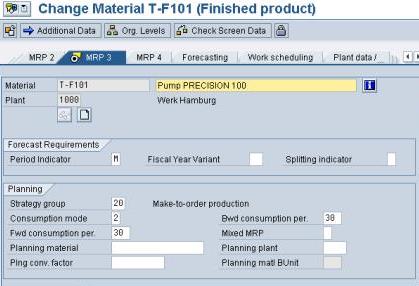
Material Master → MRP 3 View → Strategy Group = 20

Key Tcodes:

  • VA01 → Create Sales Order
  • MD04 → Stock/Requirements List
  • MD02 → Run MRP

Takeaway:

✔️ Use Strategy 20 for Make-to-Order scenarios where each sales order has unique production.
✔️ It reduces excess stock risk but may extend delivery lead time.


💡 Pro Tip:

  • Always test how orders flow through MRP.
  • Document when to use MTO vs. MTS.
  • For configurable products, you may combine MTO with Variant Configuration!


From SAP的学习和考试 Learning & Examination


As denoted by the Strategy 20 configuration, Planned Independent Requirement is not allowed for this strategy; demand is driven from Sales Order.


From SAP的学习和考试 Learning & Examination


In SAP, MTO strategy creates MTO segmentation for each MTO fulfillment tracking as the screen shot below.

The Stocks of 250 shows the COMMON STOCKS. And immediately below the 250 is the ZERO MTO stocks for the First Sales Order waiting to be fulfilled by the Planning and Execution processes.


From SAP的学习和考试 Learning & Examination

After the MRP run:

From SAP的学习和考试 Learning & Examination


Make-to-Order Planned Orders are created by the MRP run.

You can verfiy that it is a MTO Planned Order by checking the details of the Planned Order as below:


From SAP的学习和考试 Learning & Examination


As the MTO Planned Order is converted to MTO Production Order below; The X-ref is inherited to the Production Order. (Notice the Sales Order number at almost bottom left corner of the screen shot).

From SAP的学习和考试 Learning & Examination


In MTO strategy, the MTO segmentation is carried forward from Planning to Execution until the fullfillment is delivered as depicted in the Stock Requirement List below:

Complete and Continue